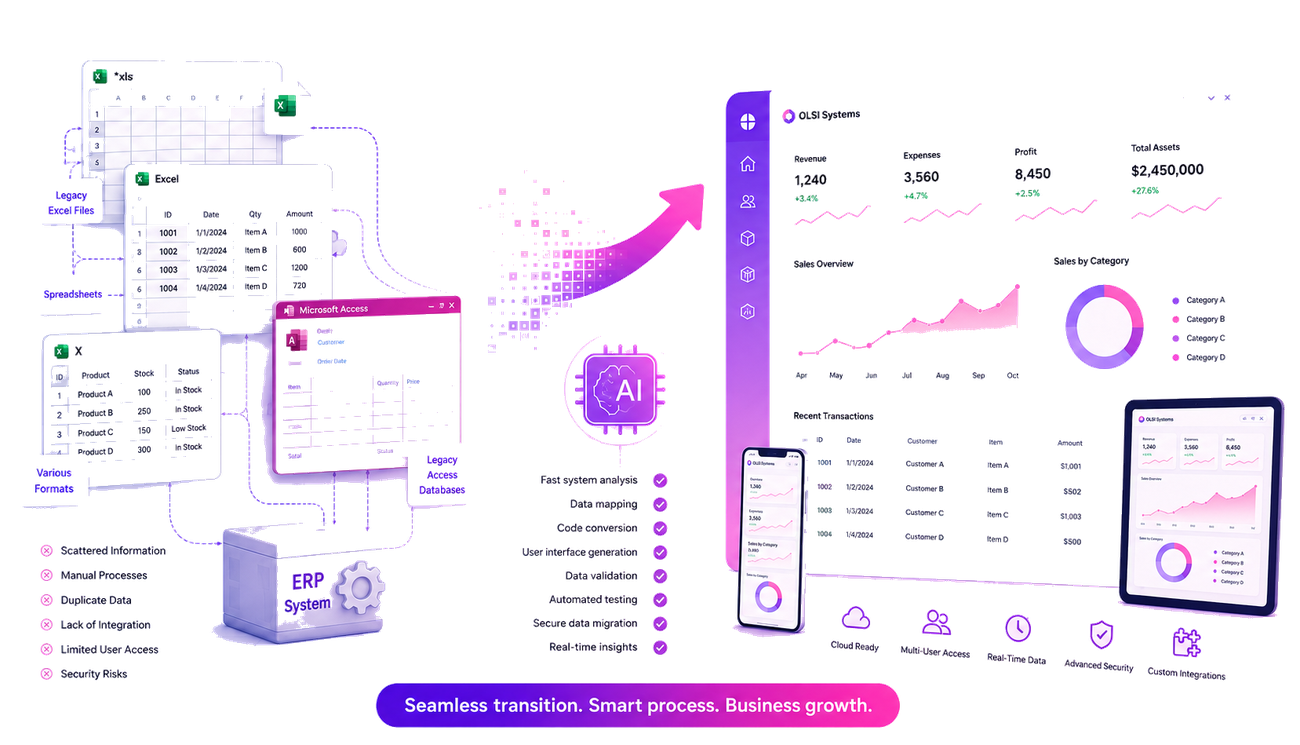
Almost every established business reaches the same point at some stage. In the beginning there was a single Excel file meant to manage inventory, a customer list, or orders. Over the years more files were added, a small Access system was built, and perhaps an adaptation to an existing ERP system was added as well. Every solution was built to answer a real need, but over time this created a complex setup based on several tools that do not communicate well with one another.
The good news is that you don't have to start everything from scratch. Today it is possible to convert existing systems into a modern web platform, preserve the data, retain the work processes, and carry out the transition gradually and safely. On top of that, incorporating artificial intelligence tools into the development process makes it possible to complete some of the stages with a speed and precision that were not achievable until just a few years ago.
When Does a Legacy System Become a Business Bottleneck?
Older systems don't stop working overnight. As a rule they keep serving the business for years, but as the business grows, the limitations start to make themselves felt.
Employees struggle to work on the same data at the same time, changes require the intervention of a professional, there is no convenient access from outside the office, and every new integration with another system turns into a project of its own.
At this stage the problem is no longer the technology, but the system's ability to support the growth of the business.
First Example: When the Business Runs on Several Excel Files
This is one of the most common scenarios. One file manages the inventory, another handles the orders, and a third is used for pricing or generating reports.
Every small change requires an update in several places, there is a risk of duplicates, and sometimes different employees use different versions of the same file.
After the migration, all of the information is centralized in a single web system based on a central database. Every user works on the same information in real time, updates happen in only one place, and the system is available from any computer, at any time.
Learn more about upgrading your business from Excel files to a smart system
Second Example: An Access System That Has Served the Business for Years
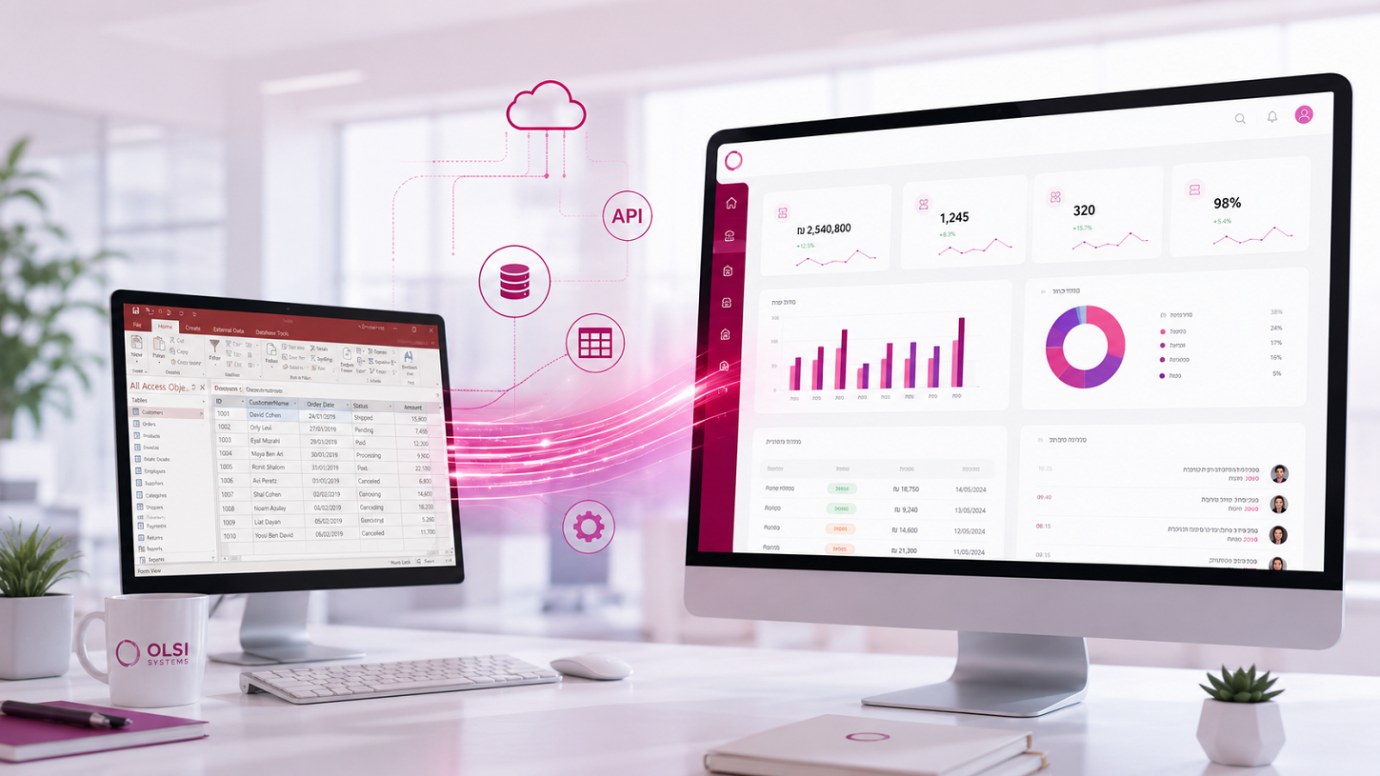
Many businesses still work to this day with an Access system that was developed specifically for them many years ago. In many cases it is a stable system that holds all of the business knowledge accumulated over the years.
The challenge is not that the system is bad, but that it no longer fits today's needs. Remote work, advanced permissions, automatic backup, connecting to additional systems, or supporting a large number of users - all of these become more complex in an aging system.
In a proper migration project, there is no need to give up the business logic that was built over the years. The goal is to move it into a modern web system, while preserving the existing data, processes, and knowledge.
Learn more about upgrading an Access system into a custom-built system
Third Example: An Old Module Inside an ERP System
In larger organizations you can often find modules that were developed specially many years ago as part of an existing ERP system.
In many cases no one knows exactly how they work anymore, yet everyone is afraid to touch them because they are an inseparable part of daily operations.
Instead of replacing the entire ERP system, it is often possible to carry out a gradual migration. You first replace the critical components, preserve business activity, and enable a controlled transition without shutting the organization down.
How Is Artificial Intelligence Changing the Migration Process?
One of the most significant changes in recent years is the use of AI tools as part of the development process.
It's important to emphasize that artificial intelligence does not replace the experience of the development team and does not make business decisions on the client's behalf. That said, it makes it possible to significantly shorten technical stages that were previously done manually.
For example, it can quickly analyze the structure of old databases, understand VBA code or a macro written years ago, generate initial documentation of the system, build basic code for new screens, and even assist with testing and with migrating the data to the new system.
When you combine professional experience with advanced AI tools, you can shorten the project timeline and reduce errors, all while maintaining high quality throughout the entire migration process.
Moving to a New System Doesn't Have to Be a Complex Project
One of the most common mistakes is to think that migrating a system means starting everything from scratch.
In practice, in most projects it is possible to preserve the existing data, transfer the history of customers, orders, and inventory, and carry out the transition in stages - all without shutting down business operations.
The goal is not to replace a system just because it is old, but to genuinely build a solution that lets the business keep growing in the years ahead as well.
OLSI Systems: A Boutique Software House With More Than 30 Years of Experience in System Migration and Software Development
For more than three decades, OLSI Systems has been guiding businesses and organizations through system migration projects, upgrading Access and Excel systems, developing advanced web systems, and building custom software.
The combination of extensive hands-on experience, familiarity with legacy systems, and advanced artificial intelligence tools allows us to carry out projects accurately, efficiently, and safely, with a full fit to the business needs of each client.
For a solution tailored to your business:
Get in touch by leaving your details for a callback, give us a call, or reach us on WhatsApp
We would be glad to help!