Lead and customer management
Every detail, history and file for each customer, all in one place.
All your leads, customers, inquiries and sales in one organized place - instead of Excel, sticky notes and an inbox. A CRM built around your sales process, not the other way around.
overview
As a business grows, managing customer information becomes more complex. New inquiries arrive from the website, quotes are sent by email, tasks move between employees and important information is stored in scattered files and systems. In that situation, even a professional, experienced team can struggle to keep work flowing.
At OLSI Systems we build the CRM around the way you actually sell: the stages, the statuses, the follow-ups and the reports that matter to you - so every team member knows what to do, and whoever manages sees the full picture. Instead of adapting your business to the limits of existing software, we develop a system that lets you work your way.
what is crm
A CRM (Customer Relationship Management) system is a software tool that centralizes customer information and lets you manage the relationship with them throughout every stage of the business activity.
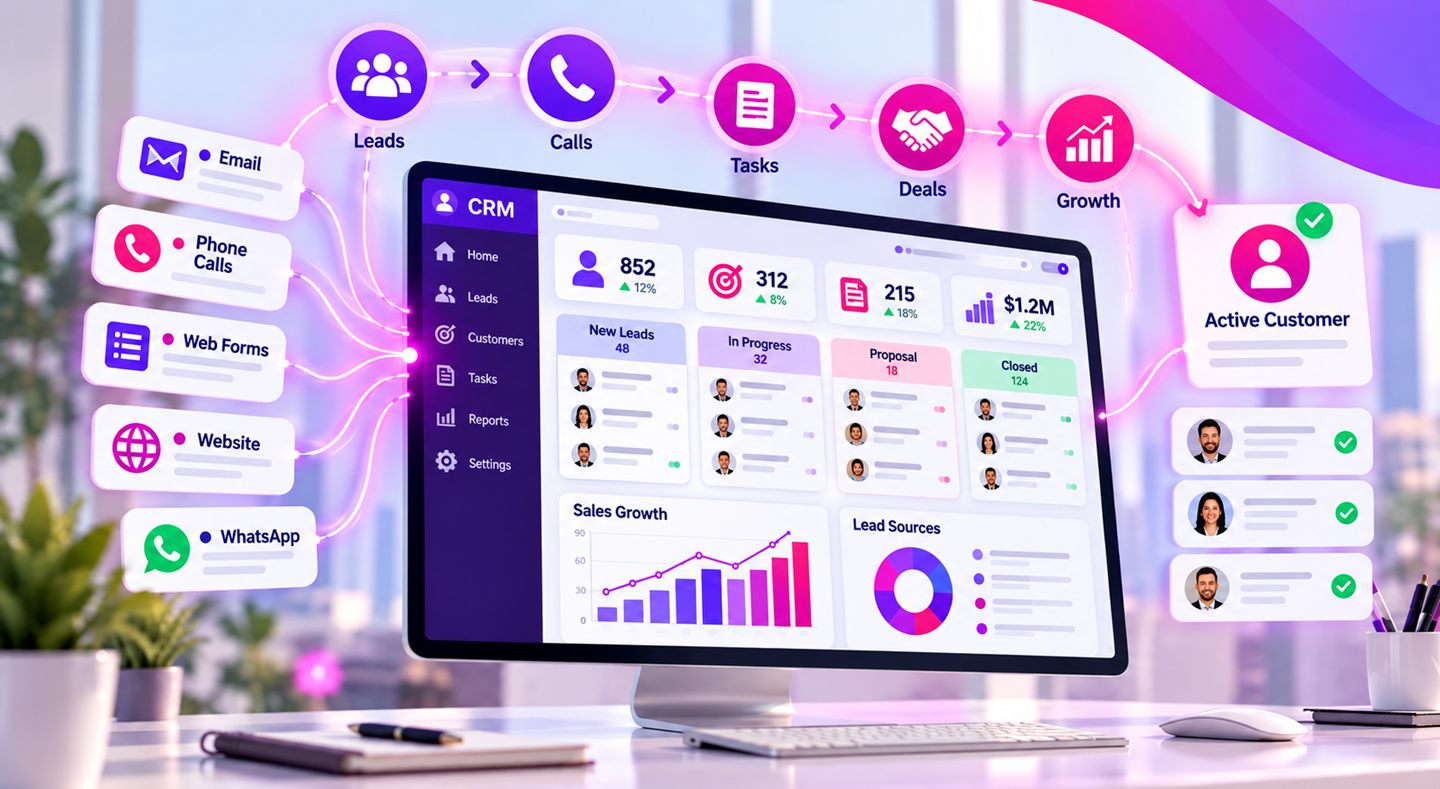
The system can hold contact details, logs of calls and meetings, quotes, documents, tasks, handling status and communication history. By keeping all the information in one place, employees get an up-to-date picture of the activity with each customer, without searching across systems and files.
Managing customer relationships through a CRM improves coordination between employees, shortens handling times and reduces repetitive manual work. When the system is built around the way the business actually works, it contributes to better service, more efficient operations and stronger sales processes.
client files
One of the main challenges in any organization is keeping information continuous, organized and accessible throughout the entire relationship with the customer. Customer file management software lets you create a digital file that centralizes all the data and actions related to each customer, in line with the nature of your activity.
A customer file can include:
When all the information is centralized in a single customer file, it is easier to hand work over between employees, trace actions that were taken and keep service continuous even when several departments are involved in the process.
what's included
Everything you need so that no lead gets lost and your whole team works from the same picture.
Every detail, history and file for each customer, all in one place.
See which stage every deal is at, and what the next step to closing is.
Automatic follow-ups so no customer and no opportunity is ever forgotten.
How many leads came in, how many closed, and who on the team is leading - all in real time.
Everyone sees what is relevant to them, with full manager oversight.
Leads come in automatically from your channels, straight into the CRM.
integrations
Many businesses use a range of tools to run their day-to-day activity: Excel spreadsheets, mailing systems, accounting software, inboxes and task-management tools. The problem begins when the same information lives in several places, employees have to enter data again and again, and there is no single clear picture of the state of customers and tasks.
Custom CRM development makes it possible to centralize the important information and connect the existing tools through suitable interfaces. For example, you can design a process where a new inquiry from the website opens in the system, is assigned to the right employee, moves through defined handling stages and is documented until the process is complete.
Through integration and API development you can connect the CRM to other systems in the organization, according to their connectivity options. Instead of switching manually between several systems, you get one work environment for end-to-end management of sales and service processes.
benefits
When the system is tailored precisely to the organization, it improves day-to-day operations, streamlines workflows and supports customer relationship management over time.
A well-planned CRM can become an engine for business growth - not only thanks to the technology, but thanks to its ability to connect people, information and processes into one efficient, organized work environment.
custom vs off-the-shelf
Not every business manages its customers the same way. In one company the sales process involves several approval stages, in another it requires tracking complex customer files, and in a third there is a need to connect service, sales and operations departments.
An off-the-shelf system may suit many businesses, but when workflows are unique or require capabilities a standard system does not offer, the need for a dedicated solution arises. A custom CRM is built around the business needs of the organization, and does not force you to change all your workflows to fit an existing system.
As part of the development you can tailor the structure of the customer files, the fields, the screens, the permissions, the approval processes, the reports and the interfaces to other systems. The result is a system tailored precisely to the organization, with the ability to expand and change capabilities as the activity evolves.
It is worth noting that custom development is not necessarily the right solution for every business. The decision should be based on the complexity of the processes, the scope of activity and the future needs - and that is exactly what we are happy to advise you on in an initial call.
how it works
A transparent process where you see, approve and stay involved at every stage - with no surprises along the way.
We understand the need and what is stuck today, with no commitment. You walk away with value from the very first call.
A specification document with the screens and the way it works. We review it together and approve it before development begins.
We build, test thoroughly, and show you a beta version to try before go-live.
The system goes live and starts working for you - and we are here for the long haul with ongoing support.
why olsi
Not the biggest, and that is exactly the point. As a boutique software house with experience since 1995, we are a small, experienced team that takes personal ownership of every line of code.
No layer of middlemen and no salespeople. Fast answers and personal accountability for what we deliver.
We do not disappear after launch. The system keeps living, improving and expanding alongside your business.
We have seen technologies come and go. We build systems that keep working long after the trends fade.
faq
Absolutely. We import all your customers and data from Excel or any existing system, so you do not start from scratch.
Customer file management software focuses on centralizing the customer's details, documents and handling history. A CRM can include those capabilities alongside lead management, sales processes, tasks, reports and automations. With custom development you can combine both according to the organization's needs.
Yes. Unlike an off-the-shelf system, we build the stages, fields and statuses to match the way you work.
The development time depends on the scope of the requirements and the complexity of the processes. A focused, basic system may take less time than one with multiple interfaces, complex permissions and cross-department workflows. The timeline is set after the specification stage.
Yes. Leads from your website, email and WhatsApp can come in automatically, so there is no need to type them in manually.
Yes. We can develop interfaces to other systems, such as accounting software, ERP systems, websites and business tools, according to each system's connectivity options and the needs you define.
Yes, though not every small business needs custom development. When customer management involves unique processes, several users or a need for automation and system integration, it is worth considering a dedicated solution.
Yes. One of the advantages of custom development is the ability to plan the system so it supports future changes and expansions. Depending on the technical architecture chosen, you can add screens, reports, automations and new interfaces.
We design a simple interface and train your team. In most cases, learning it is a matter of minutes.
Yes. Role-based permissions, backups and full access control are an integral part of the build.
Managing customers should not rely on dozens of files, separate systems and clumsy manual processes. We develop CRM systems tailored to the real needs of the business - from managing customer files and tasks to complex sales processes and connecting organizational systems.
אנחנו ב-OLSI משתמשים בעוגיות כדי לשפר את חוויית הגלישה, לנתח תנועה באתר ולהתאים תוכן שיווקי. אפשר לאשר הכל, לדחות הכל, או לבחור בדיוק מה מותר. לפרטים ראו מדיניות הפרטיות שלנו.