
A business rarely wakes up one morning and decides it needs a software development solution.
The problem starts somewhere else.
Employees key the same data into several systems. A report the manager should have at hand requires downloading Excel files every time and stitching them together by hand. The sales team cannot see the information that sits with operations. A legacy system still gets the job done, but every small change to it has turned into a project. And in other cases, the company already runs several good systems, they just do not talk to each other.
In situations like these, it is easy to conclude that you need "a new system." But that is not always the right answer.
Sometimes the right move is to build a new custom system. Sometimes it is better to upgrade the existing one. In other cases, integration between the systems, or automating a few manual tasks, can solve the problem without replacing what already works.
So how do you know which software development solution your business really needs?
Start With the Business Process, Not the Technology
One of the most common mistakes in software development is jumping into technology questions too early.
Which language will we build in? Where will the system be hosted? Which platform should we choose?
These are important questions, but they come at a later stage.
First, you need to understand what is happening in the business today.
How does an order move from the moment the customer places it until it is delivered? Where do employees enter information? Which tasks are done manually? Who uses each system? Where does the data come from? And at what point in the process do delays, errors, or duplicate work start to appear?
A good software solution does not start with code. It starts with understanding the process that code is supposed to improve.
You Don't Always Need a New System
When a workflow no longer fits the existing tools, the first instinct is often to replace everything.
But in the real world, a company might have an ERP system that works well, a CRM its employees already know, an accounting system holding years of data, and another system that serves the field team.
The problem is not necessarily in any one of them. Sometimes the problem is what happens between them.
That is why software development solutions can take different forms: developing a new custom system, upgrading existing software, building an integration via API, automating processes, or turning a tool built on Excel or Access into a proper business system.
The goal is not to add yet another piece of software to the business. The goal is to find the point of intervention that solves the problem in the most effective way.
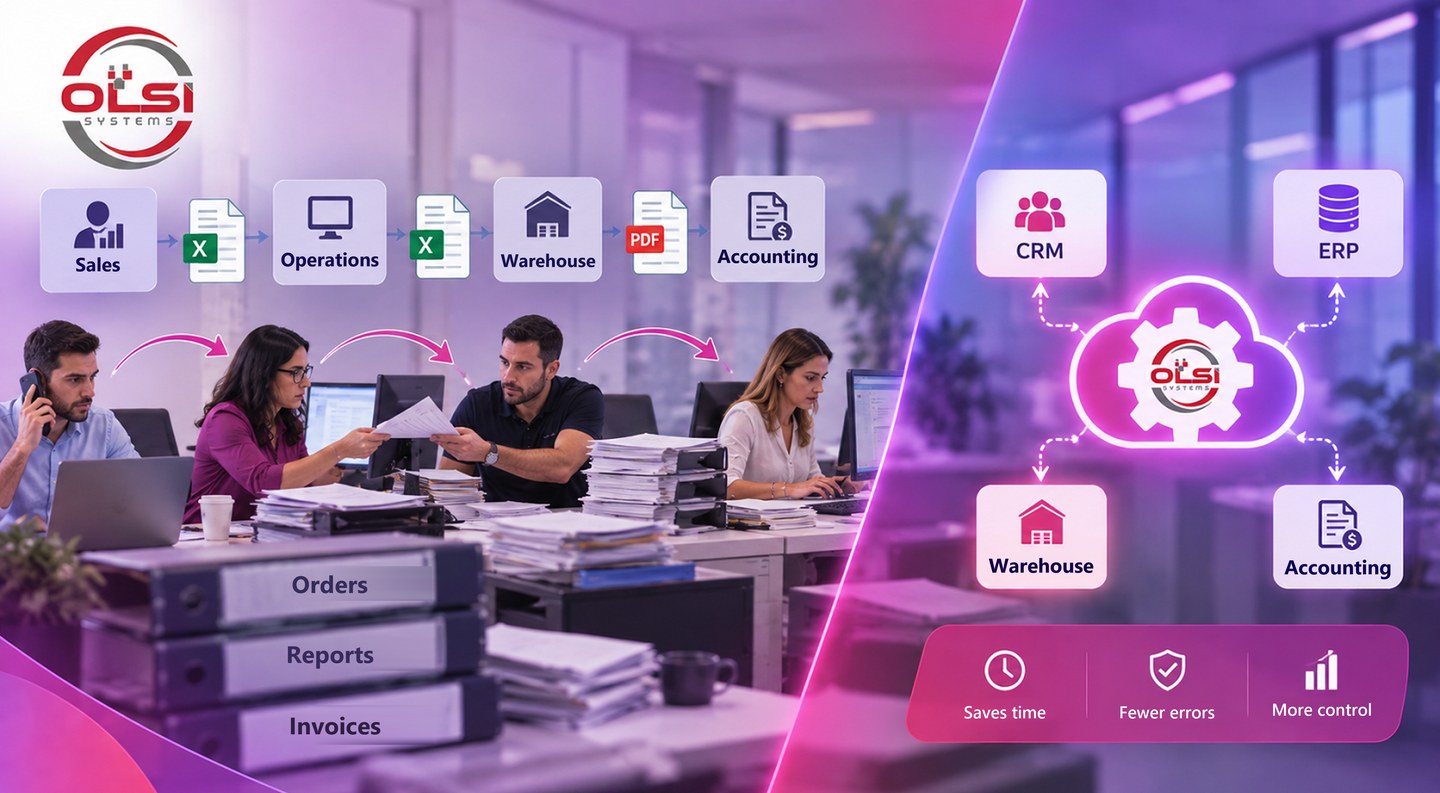
Sign One: Employees Copy the Same Information From System to System
Say a new order comes in through the sales team.
The order details are entered into one system. Then someone transfers them to the operations system. The warehouse receives a separate file, and later some of the information is typed in again for billing or generating documents.
Each system on its own may be excellent.
But if employees are effectively serving as the "bridge" between systems, you end up with a process that is slower, harder to control, and more prone to errors.
In a case like this, the answer is not necessarily a new system. Sometimes integration between the systems can move information automatically from point to point and save a large share of the manual work.
Sign Two: An Excel File Has Become a Critical System
Excel is an excellent tool, and using it is not the problem.
The problem starts when a file created a few years ago for a one-off task gradually becomes the system a core company process depends on.
More columns get added. Then formulas. Then macros. More employees start using the file, different copies of it appear, and eventually it turns out there is exactly one person in the organization who really knows how it all works.
At this point, it is worth checking whether the tool still fits the job.
Sometimes the existing file can be improved. In other cases, the right move is to shift the process to a multi-user system that supports permissions, controls, simultaneous work, and connections to other systems in the organization.
Sign Three: The Business Has Changed, but the Software Has Fallen Behind
A system built ten or fifteen years ago has not necessarily become a bad system.
It may still perform the task it was built for very well.
But the business around it has changed.
Customers, employees, branches, products, processes, and requirements have been added. Employees start doing things outside the system because it offers no convenient way to do them. Information travels by email and WhatsApp, reports are produced by hand, and temporary workarounds become a permanent part of the workflow.
Here too, you do not always need to wipe everything and start over.
Legacy systems often hold years of business logic and organizational knowledge. The right development solution can preserve what works, modernize the parts that have become a limitation, and add capabilities that match the company's current needs.
Sign Four: Every Department Has a Different Picture of the Business
- The sales team looks at the CRM.
- Operations works in a different system.
- The warehouse manages inventory somewhere else.
- Accounting keeps its own data.
And when a manager wants to know what is really going on, someone has to pull data from several sources and combine it into a single report.
This is not necessarily a problem of too little information. Sometimes it is actually a problem of too many data sources that are not connected to one another.
A development solution can create a layer that connects the data, keeps it in sync, and lets users get the information relevant to them without doing manual collection work every time.
When Does Custom Software Development Become the Right Option?
Off-the-shelf software is an excellent solution when your business's needs are similar to those of thousands of other businesses.
But the more unique the business process, the wider the gap that can open between the way the system is built and the way the company actually works.
And then something interesting happens: instead of the software serving the process, employees start changing the process to fit the software.
When adjustments and workarounds become a permanent part of the job, it is worth considering custom software development.
The advantage is not that everything is built from scratch. The advantage is the ability to build around the organization's workflow: its users, permissions, data, connections to other systems, and the actions that are truly needed day to day.
Software Development Solutions That Start With Understanding the Business
At OLSI Systems, we have been in software development since 1995. Over the years, technologies have changed again and again, but one principle has stayed the same for us: before writing code, you need to understand the business.
We look at how the process works today, where it gets stuck, which systems are already in place, and what really needs to change.
Sometimes the result will be a new custom system. In other cases, the right solution will be connecting systems, upgrading legacy software, development around Excel or Access, automation, or another focused solution.
As OLSI, a boutique software house, we work with a small, experienced team and in direct contact with the people who specify and develop the solution. The goal is not to sell the business another system, but to build a solution that fits the process it needs to manage.
Do you have a cumbersome process, a system that can no longer keep up, or an idea you want to turn into a software solution?
We would be glad to help!